If you are asking can you use a car GPS on a motorcycle, the short answer is yes, provided you build your handlebar setup around the physical limits of an automotive navigator. Riders have adapted Garmin Nuvi and Garmin Drive units for fair-weather touring for decades, and putting an existing car GPS to work on your bike is a practical way to get offline satellite turn-by-turn directions without spending hundreds of dollars on a second device. However, an automotive GPS is engineered for a dry, climate-controlled dashboard rather than an exposed motorcycle cockpit, so keeping it alive and readable requires the right mechanical mount, continuous 12V or USB power, and a realistic plan for rain and helmet audio.
If you are still weighing whether to adapt an automotive unit, mount your smartphone, or invest in a rugged navigator, start with our guide to choosing the best motorcycle GPS. Our recommendations draw on 20 years of experience selling and evaluating GPS devices and mounting equipment, supported by product research and technical analysis.
Quick answer: Yes, you can use a Garmin Drive or older Garmin Nuvi car GPS on a motorcycle for fair-weather street riding. Never use the automotive windshield suction cup on a bike; instead, secure the unit with a mechanical RAM handlebar or clutch mount. You will also need continuous USB or 12V power (since car GPS batteries last about an hour), a rain cover or tank bag for wet weather, and a clear line of sight to the screen because standard car GPS units cannot stream turn directions to a Bluetooth helmet headset.
Why a Car GPS Works on a Bike (and Where It Struggles)
From a satellite-navigation standpoint, a car GPS has zero trouble operating on two wheels. Inside the plastic housing, a Garmin Drive or legacy Garmin Nuvi locks onto GPS satellites, stores offline North American street maps in its internal memory, calculates turn-by-turn routes, and displays your live speed and upcoming lane changes just as accurately on a motorcycle as it does inside a sedan. Because the maps live on the hardware, it will guide you through remote mountain passes and desert highways where cellular service disappears completely.
The challenges are entirely mechanical and environmental. Inside a passenger car, a navigator sits shaded by a roof, protected from windblast and rain, isolated from raw engine vibration, and plugged into a dry 12V cigarette-lighter socket. Once you bolt that same device to motorcycle handlebars, it is exposed to six conditions it was never built to handle:
- Rain, fog, and road spray: Automotive GPS housings have unsealed speaker grilles, open power ports, and zero ingress-protection rating against water.
- Continuous handlebar vibration: High-frequency engine buzz and sharp pavement impacts stress unreinforced plastic cradle tabs and internal solder joints.
- Direct overhead sunlight: Car displays are tuned for shaded interiors and can wash out quickly when bright midday sun hits the glass from behind your helmet.
- Gloved hand operation: Newer capacitive glass touchscreens require conductive fingertips, while smaller on-screen icons can be tricky to tap accurately with thick riding gloves.
- Highway wind noise: An automotive GPS relies on a tiny built-in speaker that is completely inaudible through earplugs and a full-face helmet at 60 mph.
- Short internal battery life: Most car navigators are designed to run on continuous vehicle power and shut down within 45 to 60 minutes on battery alone.
None of those limitations mean you cannot ride with a car GPS. They simply mean you have to treat the unit as fair-weather equipment and solve the mounting, power, and weatherproofing pieces before you pull out of the driveway.
Car GPS vs. Dedicated Motorcycle GPS: Key Differences
To see where the engineering diverges, it helps to compare Garmin’s most practical current 5-inch car navigator, the Garmin Drive 53, against Garmin’s purpose-built motorcycle navigator, the Garmin Zumo XT3 (available in 4.7-inch and 6-inch versions). While both run Garmin street maps and guide you from Point A to Point B, nearly every physical and software detail is built for a different environment.
| Feature or Specification | Garmin Drive 53 (Car GPS) | Garmin Zumo XT3 (Motorcycle GPS) |
|---|---|---|
| Intended Environment | Enclosed car dashboard or windshield | Exposed motorcycle handlebars and cockpits |
| Display Size & Resolution | 5-inch glass capacitive (800 x 480 WVGA) | 4.7-inch or 6-inch glove-friendly HD (1280 x 720) |
| Water & Dust Rating | None (not weatherproof) | IPX7 water-resistant and IP6X dust-tight |
| Vibration & Drop Rating | Standard automotive cabin tolerance | MIL-STD-810 tested for vibration and drop shock |
| Included Mounting Hardware | Windshield suction cup with 17mm snap ball | RAM handlebar U-bolt, arm, AMPS plate & powered cradle |
| Power Connection | Rear mini-USB port with 12V car plug | Hardwired weatherproof pin cradle (3A fused harness) |
| Internal Battery Runtime | Up to 1 hour | Up to 7 hours (up to 5 hours at 100% backlight) |
| Bluetooth Helmet Headset Audio | No (internal speaker only) | Yes (streams spoken prompts to Sena/Cardo headsets) |
| Motorcycle Routing & GPX Support | Standard A-to-B car routing | Garmin Adventurous Routing, GPX tracks & Tread app |
Using a Current Garmin Drive 53 vs. an Older Garmin Nuvi
Whether you are pulling a ten-year-old navigator out of a desk drawer or buying an inexpensive new car unit to share between your truck and your motorcycle, knowing the hardware differences between Garmin generations will save you frustration on the road.
The Current Car Option: Garmin Drive 53
If you are buying a brand-new automotive Garmin today with plans to use it occasionally on a motorcycle, the Garmin Drive 53 is the model that makes the most physical sense. Many modern automotive navigators have ballooned to 7-inch, 8-inch, or even 10-inch tablet proportions that look ridiculous on handlebars and block your speedometer. The Drive 53 keeps a compact 5-inch footprint (4.97 inches wide by 3.33 inches high) and weighs just 2.43 ounces (69 grams), making it light enough that it will not torque a handlebar mount over rough pavement.
It includes preloaded North American street maps, useful driver alerts for upcoming sharp curves and speed changes, U.S. national parks directories, and Tripadvisor point-of-interest ratings. Keep two hardware traits in mind when adapting the Drive 53 to a bike: first, its 5-inch glass display is a multi-touch capacitive screen, meaning you will need touchscreen-compatible riding gloves (or conductive thread on your index finger) to tap the map while stopped. Second, its internal battery is rated for up to 1 hour, so you must connect its rear mini-USB port to a motorcycle power source for any ride longer than a quick local errand.
Why Older Garmin Nuvi Units Still Have a Cult Following on Bikes
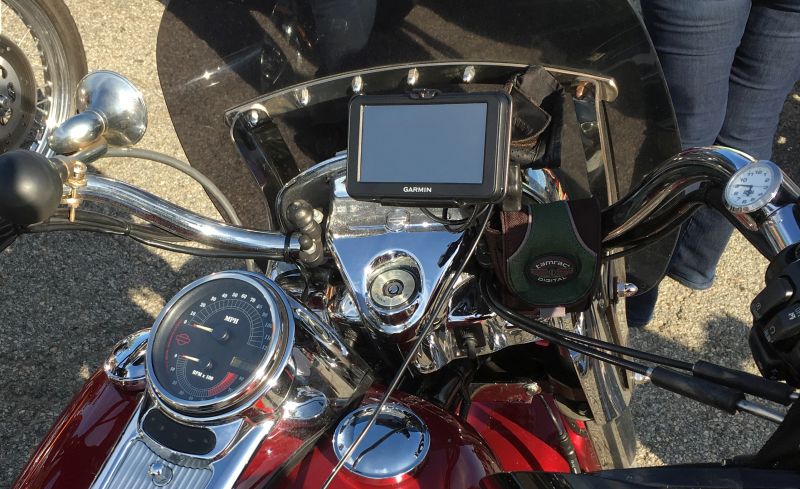
The photo at the top of this guide shows a classic Garmin Nuvi 2455LMT mounted on a Harley-Davidson, and plenty of riders still run older 4.3-inch and 5-inch Nuvi models (such as the Nuvi 50LM, 2455LMT, 2555LMT, or 2597LMT) for a specific technical reason: resistive touchscreens. Unlike modern smartphone-style glass displays, older Garmin Nuvi units used pressure-sensitive resistive screens that respond to physical force rather than skin conductivity. That means you can press the large on-screen buttons with thick leather gauntlets, winter gloves, or even the knuckle of a glove without any special conductive fingertips.
If you already own a working Garmin Nuvi with lifetime map updates (“LM” or “LMT” models), connect it to a computer running Garmin Express to install the latest map build, check whether you need a microSD card for extra map storage, and keep using it. While buying a decade-old used Nuvi with a tired internal battery makes little sense today, repurposing a healthy unit you already own costs almost nothing.
How to Mount a Car GPS on Motorcycle Handlebars
The single most important mechanical rule is simple: never use the automotive windshield suction cup mount on a motorcycle. Motorcycle windscreens flex, vibrate, and curve in ways automotive glass does not, and painted fuel tanks or fairing panels will allow a dry suction cup to pop loose without warning at highway speed. You need a mechanically bolted mount attached to your handlebars, brake/clutch reservoir perch, fork stem, or mirror stem.
Important: Standard Garmin automotive cradles use a small 17mm snap-in ball on the back of the clip, whereas motorcycle RAM Mounts use a much larger 1-inch (25.4mm) B-size rubber ball. You cannot push a plastic Garmin car bracket onto a 1-inch RAM ball. To mount a car GPS on handlebars, you must use a universal holder with a 1-inch ball, bolt a model-specific RAM cradle to an AMPS ball plate, or use a handlebar weather case.
Step 1: Install a 1-Inch RAM Handlebar or Clutch Base
Your foundation on the motorcycle is a standard RAM B-size (1-inch ball) base and double-socket arm. The RAM-B-149Z-U handlebar and brake/clutch mount kit is the most versatile starting point because it includes both a zinc-coated U-bolt for round handlebars (fitting 0.5-inch to 1.25-inch bars) and replacement bolt/spacer hardware for brake or clutch master cylinder clamps, paired with a medium 3-inch double-socket arm and a diamond AMPS ball adapter. For a complete walkthrough on choosing between handlebar, clutch, fork-stem, and mirror bases, see our motorcycle GPS mount and installation guide.
Step 2: Choose the Right Holder for Your Car GPS
Once you have a 1-inch RAM arm on the bike, there are three practical ways to hold a Garmin Drive or Nuvi:
- Universal Spring-Loaded Holder (RAM X-Grip): Because model-specific plastic cradles are rarely made for newer automotive GPS units like the Garmin Drive 53, the RAM X-Grip Universal Holder with 1-Inch Ball (RAM-HOL-UN7BU) is the easiest way to grip a 5-inch car GPS or smartphone. Its four rubber-coated fingers clamp the sides of the housing while leaving the rear mini-USB port and power button completely unobstructed. Always stretch the included rubber safety tether around the four corners of the GPS before riding so a sharp pothole cannot bounce the lightweight unit out of the fingers.
- Model-Specific RAM EZ-Roll’r Cradle (For Older Nuvi Models): If you own a popular older Garmin Nuvi, RAM produced form-fitting composite cradles (such as the RAM-HOL-GA series) that bolt directly to the 2-hole diamond AMPS ball included in the RAM-B-149Z-U kit.
- Zippered Weather-Resistant Handlebar Case: If you want a single enclosure that mounts to the bars and shields the car GPS from light road spray and dust, a zippered 5-inch motorcycle GPS case with a clear touch window can hold the unit, though the plastic window adds reflection in bright sun.
Five Pre-Ride Mechanical Checks
Before taking an adapted automotive GPS onto the highway, check these five details while parked:
- Positive retention: Tug on the GPS by hand to confirm the cradle latch or X-Grip fingers hold the chassis firmly.
- Backup safety tether: Always loop the elastomeric rubber tether over the corners of the GPS when using a spring-loaded holder.
- Full steering lock clearance: Turn the handlebars all the way to the left stop and all the way to the right stop to confirm the GPS never touches the fuel tank, windscreen, or Mirrors.
- Gauge and warning-light visibility: Sit in your normal riding posture and make sure the screen does not hide your speedometer, turn indicators, or oil light.
- Sun glare angle: Tilt the mount slightly downward toward your chest so the glass display does not reflect the bright sky into your helmet visor. If reflections remain an issue, read our guide to reducing motorcycle GPS sun glare.
How to Power a Garmin Car GPS on a Motorcycle
Unlike a Garmin Zumo XT3, which locks into a weatherproof powered cradle wired directly into the bike’s electrical system, an automotive Garmin receives power through a recessed USB port on the back of the housing. Because the internal battery in a Garmin Drive 53 or older Nuvi only lasts around 45 to 60 minutes, running on battery power is not realistic for anything beyond a short cross-town ride.
Check the exact port on the back of your navigator before buying cables. Even though the Garmin Drive 53 is a current model, it uses a traditional mini-USB power receptacle on the back of the unit (the same trapezoid-shaped 5-pin connector used on legacy Garmin Nuvi models), while a few mid-generation Garmin DriveSmart models used micro-USB or USB-C. You have three reliable ways to supply power on a motorcycle:
- Factory 12V accessory socket: If your touring bike or adventure motorcycle has a standard 12V cigarette-lighter style socket near the dash, you can plug the factory Garmin vehicle power cable straight in.
- Handlebar USB charger or factory USB port: You can run a short USB-A-to-mini-USB (or USB-C-to-mini-USB) cable from a weatherproof handlebar USB port to the back of the GPS. Note that some older Garmin Nuvi units enter “Computer File Transfer Mode” when plugged into a standard data USB cable; if yours shows a computer icon instead of loading the map, use a power-only charging cable or a Garmin-compatible 5V power adapter.
- SAE-to-USB adapter on a battery tender lead: If your bike already has an SAE quick-disconnect pigtail wired to the battery for a charger, plugging in an SAE-to-USB adapter gives you an instant 5V power source without permanent wiring.
Whichever connection you choose, route the power wire cleanly along the handlebar loom, zip-tie slack away from hot exhaust pipes and moving fork tubes, and verify that the cable never pulls tight at full steering lock. Because vibration on a motorcycle can slowly wiggle a hanging mini-USB plug loose and damage the internal solder pads on the circuit board, leave a gentle strain-relief loop near the cradle so the weight of the wire is not pulling downward on the port. We cover fused wiring, switched power, and USB adapters in detail in our motorcycle USB charger and GPS power guide.
Weatherproofing: Dealing With Rain and Road Spray
Water is the fastest way to kill an automotive GPS on a motorcycle. A Garmin Drive or Nuvi has no rubber gasket between the screen bezel and the rear shell, an open speaker grille on the back, and an unsealed mini-USB charging port. Even ten minutes of highway spray thrown up by a semi-truck ahead of you can push moisture past the bezel or short out the charging pins.
If dark clouds roll in during a ride, you have four realistic ways to handle a car GPS:
- Unclip the GPS and store it dry (Safest): The most dependable rain strategy with an exposed RAM X-Grip or EZ-Roll’r cradle is to pull over, unplug the mini-USB cord, pop the GPS out of the mount, and drop it into a waterproof jacket pocket, tank bag, or saddlebag until the storm passes.
- Use a zippered weather-resistant handlebar case: Mounting the car GPS inside a dedicated weather-resistant enclosure shields it from light rain and road mist, though you should always inspect the bottom cable pass-through slot to make sure water is not wicking up the power cord into the case.
- Tuck the mount behind a full touring fairing: On a Harley-Davidson Electra Glide, Honda Goldwing, or large sport-tourer, mounting the GPS low behind a tall windshield keeps direct raindrops off the unit while you are moving at speed, though the GPS will still get wet as soon as you stop at a traffic light.
- Carry an emergency zip-top bag and rubber band: In a sudden summer shower, slipping a clear freezer bag over the housing and securing the bottom around the RAM arm with a heavy rubber band can save the electronics long enough to reach shelter.
For a full breakdown of IPX7 versus IP67 water ratings and enclosed handlebar cases for non-waterproof devices, read our guide to keeping a motorcycle GPS dry in the rain.
What You Give Up: Helmet Audio and Motorcycle Routing
Even if you solve the mounting, power, and fair-weather protection puzzles, there are two day-to-day operational differences between a car GPS and a motorcycle GPS that catch many riders by surprise.
1. No Bluetooth Audio to Your Helmet Headset
In a quiet car cabin, you listen to spoken street names through the speaker on the back of the Garmin. On a motorcycle at 65 mph, wind roar and engine noise completely drown out that tiny speaker. Many riders see “Bluetooth” listed on the spec sheet of the Garmin Drive 53 & Live Traffic model and assume it will pair to a Sena or Cardo helmet communicator. It will not. On automotive Garmin Drive units, Bluetooth is strictly a data link that pairs to your smartphone running the Garmin Drive app to pull live traffic and weather updates; it lacks the Bluetooth audio transmitter profile required to send spoken turn-by-turn prompts to a motorcycle Bluetooth helmet headset. When you ride with a car GPS, you are relying entirely on visual glances at the map screen.
2. Efficiency Routing vs. Twisty Motorcycle Roads
An automotive GPS is programmed to think like a commuter: its core algorithms calculate the fastest time (usually interstates and divided highways) or the shortest distance between two points. A dedicated motorcycle navigator is built around the ride itself. Garmin’s Zumo lineup includes Garmin Adventurous Routing, which lets you adjust sliders to favor curvy backroads, hills, and scenic byways while avoiding monotonous interstates. Dedicated motorcycle units also support full GPX track and route management, off-road topographic maps, satellite imagery, and a built-in digital fuel-range tracker that warns you to look for a gas station before your motorcycle tank runs dry.
When to Upgrade to a Dedicated Motorcycle GPS
Using a car GPS on a motorcycle makes complete sense when you already have a Garmin sitting in your glovebox, ride primarily on sunny weekends, only need visual A-to-B street guidance, or want a single portable navigator you can swap between an older car and your bike. There is no reason to apologize for a budget setup that gets you where you want to go.
However, if you are buying new equipment specifically for motorcycle touring, riding through unpredictable weather, importing club GPX routes, or expecting spoken turn directions inside your helmet, adapting a car GPS quickly becomes a false economy. By the time you buy a new automotive GPS, a RAM handlebar kit, a universal holder, a USB power adapter, and a rain enclosure, you are halfway to the cost of a purpose-built motorcycle navigator that still lacks waterproofing and helmet audio.
For riders ready for a dedicated cockpit setup, the Garmin Zumo XT3 is built from the ground up for motorcycle life. Available in both a compact 4.7-inch version and a larger 6-inch version, the XT3 provides an IPX7 waterproof and IP6X dust-tight housing, MIL-STD-810 vibration resistance, a bright glove-friendly HD display, Bluetooth headset audio, and a hardwired powered AMPS motorcycle cradle right in the box. You can read our complete Garmin Zumo XT3 review to compare both screen sizes and features.
Car GPS vs. Smartphone Navigation on a Motorcycle
Riders looking for a low-cost navigation setup often wonder why anyone would bother mounting a Garmin car GPS when every rider already carries a smartphone running Google Maps, Apple Maps, or Waze. For short urban rides with strong cell coverage, a phone on a vibration-dampened mount is hard to beat for live traffic and quick destination searches.
Where an older or inexpensive Garmin car GPS still earns its keep as a middle ground is hardware preservation and offline independence. Leaving a flagship smartphone bolted to motorcycle handlebars in July heat while charging and running GPS at 100% screen brightness frequently causes the phone to overheat and dim its screen, while continuous engine vibration can degrade optical image stabilization (OIS) camera modules if your mount lacks a vibration dampener. A standalone Garmin car GPS keeps your expensive phone safely tucked inside your jacket pocket for emergencies, never loses its map when you ride out of cellular range, and costs very little to replace if a rock kicked up on the highway ever cracks the glass.
Frequently Asked Questions
Will a Garmin car suction cup mount hold on a motorcycle windshield or gas tank?
No. Automotive suction cups are designed for flat, rigid, interior laminated glass inside an enclosed car. On a motorcycle, polycarbonate windscreens and curved fuel tanks flex continuously and experience high-frequency vibration and wind buffeting that break the vacuum seal. Always use a mechanically bolted handlebar, clutch-perch, fork-stem, or mirror-stem mount on a motorcycle.
Can a Garmin Drive 53 pair to a Bluetooth motorcycle helmet headset?
No. While the Garmin Drive 53 & Live Traffic model includes Bluetooth for connecting to the Garmin Drive smartphone app to receive live traffic and weather data, it does not transmit Bluetooth audio to headphones or motorcycle helmet communicators like Sena or Cardo. To get spoken turn-by-turn directions in your helmet, you need either a dedicated motorcycle GPS like the Garmin Zumo XT3 or a smartphone paired directly to your headset.
Do motorcycle gloves work on a Garmin car GPS touchscreen?
It depends on the generation of your Garmin. Older Garmin Nuvi units (such as the Nuvi 2455LMT or 2555LMT) used pressure-sensitive resistive screens that respond to any glove, finger, or fingernail. Newer automotive models like the Garmin Drive 53 use a glass capacitive touchscreen similar to a smartphone, which requires either touchscreen-compatible riding gloves with conductive fingertips or a bare finger when parked.
How long will a Garmin car GPS run on its internal battery on a motorcycle?
A new Garmin Drive 53 is rated for up to 1 hour of battery life on a full charge, and older Garmin Nuvi units with aged lithium-ion batteries often last only 20 to 45 minutes unplugged. For any normal motorcycle ride, you should plan on connecting the GPS to a handlebar USB charger, a 12V accessory outlet, or an SAE-to-USB battery lead.
Bottom Line: Should You Put a Car GPS on Your Motorcycle?
If you already have a working Garmin Nuvi or Garmin Drive 53 sitting in a drawer or car glovebox, there is nothing wrong with bolting a RAM-B-149Z-U handlebar mount and a RAM X-Grip holder to your motorcycle and putting that navigator to work on fair-weather rides. As long as you ditch the windshield suction cup, supply steady 5V/12V power to the rear port, and pack the unit away when rain threatens, a car GPS will guide you across the country without costing you a small fortune. On the other hand, if you are buying a brand-new navigator specifically for all-weather touring, GPX route planning, and Bluetooth helmet audio, skip the workarounds and invest in a dedicated motorcycle unit like the Garmin Zumo XT3.