
Released in late 2013 as the successor to the Zumo 350LM, the Garmin Zumo 390LM served for years as Garmin’s compact, mid-priced 4.3-inch motorcycle GPS navigator. Positioned right below the larger 5-inch Zumo 590LM, the Zumo 390LM gave riders an IPX7 waterproof housing, a glove-friendly resistive touchscreen, Curvy Roads routing, Bluetooth helmet audio, and native ANT+ tire pressure monitoring without the bulk or price tag of a full-dress touring unit. Although the Zumo 390LM is long discontinued and unavailable new at retail, thousands of these durable 4.3-inch navigators are still bolted to motorcycles across North America.
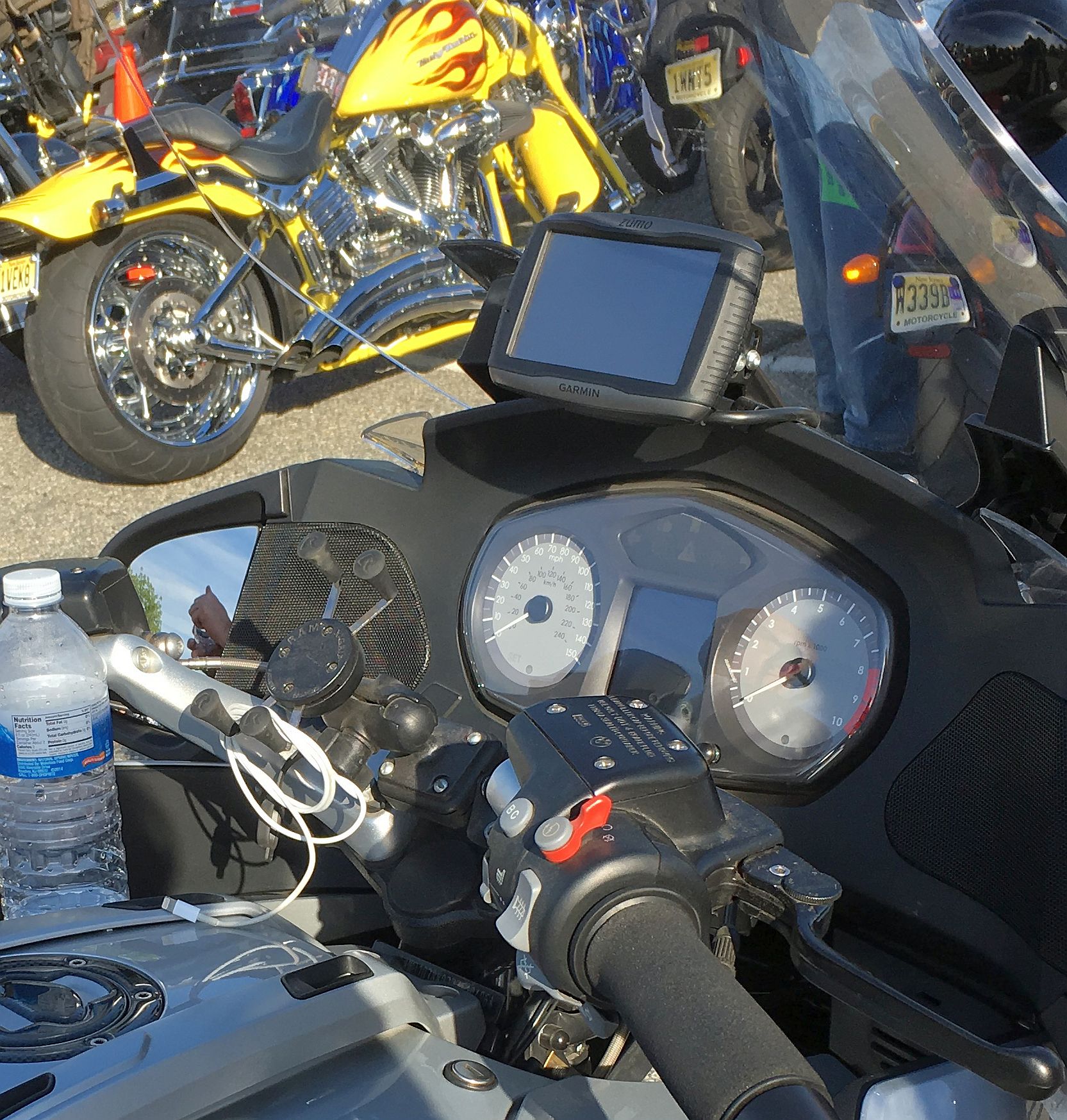
If you recently bought a used motorcycle with a Zumo 390LM cradle wired to the battery, need to replace an aging internal battery that no longer holds a charge, or want to see how this classic 4.3-inch unit compares to today’s high-definition Garmin Zumo XT3, this owner and buyer guide covers all the technical details. Our recommendations draw on 20 years of experience selling and evaluating GPS devices and mounting equipment, supported by product research and technical analysis.
Quick answer: Because the Garmin Zumo 390LM has been out of production for years and uses a low-resolution 480 x 272 screen, an older Mini-USB computer connection, and no smartphone app integration, we do not recommend buying one today. If you already own a working 390LM, adding a FAT32 microSD card and replacing the internal 361-00059-00 battery will keep its free Lifetime Maps running. If you are ready for a modern HD display with wireless map updates and GPX syncing, upgrade to the Garmin Zumo XT3.
Why the Garmin Zumo 390LM Is Obsolete (And What to Buy Today)
Garmin launched its Zumo motorcycle line in 2006, and by the time the Zumo 390LM arrived, the rugged 4.3-inch chassis had proven it could survive heavy rain, fuel splashes, UV rays, and handlebar vibration that quickly shook car navigators to pieces. Unlike the larger 590LM, the 390LM even packed an internal speaker inside the waterproof GPS body itself, allowing riders to hear voice prompts in a car or garage without needing a speaker built into the cradle.
However, more than a decade of navigation advances has left the Zumo 390LM dated in four major areas:
- Low-resolution 480 x 272 WQVGA display: The 390LM’s 4.3-inch resistive screen packs just 480 x 272 pixels and is locked to landscape orientation only. Compared to modern 1280 x 720 HD IPS displays, map text looks blocky, zoom transitions are slow, and small on-screen keyboard buttons can be tricky to tap accurately while wearing thick winter gloves.
- Zero smartphone app or music integration: Unlike the Garmin Zumo 590LM and Garmin Zumo 595LM, the Zumo 390LM has no MP3 player, no Pandora or Spotify controls, and no companion smartphone app for wireless GPX transfers or live weather radar.
- Desktop Mini-USB updates only: The Zumo 390LM has no built-in Wi-Fi and uses an older Mini-USB port (not Micro-USB or USB-C) beneath a rear rubber weather flap. Installing map updates or loading routes from Garmin BaseCamp requires connecting the unit to a home computer with a Mini-USB data cable.
- Sealed Torx-screw battery housing and discontinued ANT+ sensors: Unlike the 590LM’s quick-release battery door, swapping a dead battery in a 390LM requires unscrewing 10 tiny Torx screws on the rear casing. In addition, the optional Garmin ANT+ Tire Pressure Monitor Sensors and VIRB cameras that once paired with the 390LM are long out of production.
| Specification / Feature | Garmin Zumo 390LM (Discontinued) | Garmin Zumo XT3 (Current Flagship Lineup) |
|---|---|---|
| Display Size & Resolution | 4.3-inch WQVGA TFT (480 x 272 pixels, landscape only) | 6.0-inch or 4.7-inch HD IPS (1280 x 720 pixels, dual orientation) |
| Physical Dimensions & Weight | 5.12 x 3.70 x 1.18 inches; 9.5 ounces (270 grams) | Approx. 7 ounces (4.7-inch) or 12 ounces (6.0-inch) |
| Internal Storage & microSD Format | Internal solid state; microSD requires FAT32 format | 64 GB internal storage; microSD up to 256 GB (exFAT supported) |
| GPS Positioning Rate | Standard 1 Hz receiver | High-speed 25 Hz multi-GNSS positioning |
| Battery Life Claim | Up to 7 hours (internal 361-00059-00 pack) | Up to 7 hours (or up to 5 hours at 100% backlight) |
| Environmental Rating | IPX7 waterproof | IPX7 water rating, IP6X dust rating, MIL-STD-810 tested |
| Smartphone App & Audio | Bluetooth directions & phone calls only (no MP3 or app) | Garmin Tread app (wireless GPX sync, music control, alerts) |
| Map Updates & USB Port | Mini-USB cable to PC via Garmin Express | Built-in Wi-Fi updates without a computer (plus USB-C) |
The Best Modern Upgrade: Garmin Zumo XT3 (6-Inch or Compact 4.7-Inch)
If you are ready to retire an aging Zumo 390LM or want a modern navigator for a new bike, the Garmin Zumo XT3 is the benchmark replacement. For riders who loved the compact handlebar footprint of the 4.3-inch Zumo 390LM on a naked bike, dual-sport, or crowded sport-touring cockpit, Garmin makes the Zumo XT3 in a compact 4.7-inch size that weighs roughly 7 ounces (2.5 ounces lighter than the 390LM) while delivering a razor-sharp 1280 x 720 HD screen. And if you want maximum map visibility for open-road touring, the 6-inch Garmin Zumo XT3 gives you a massive screen upgrade that bolts directly onto the exact same 4-hole AMPS RAM plate behind your old 390LM cradle.
Both Zumo XT3 sizes feature built-in Wi-Fi for computer-free map updates, 64 GB of internal memory, 25 Hz GPS refresh rates, and wireless GPX route sharing through the Garmin Tread smartphone app. Check out our in-depth Garmin Zumo XT3 review and our best motorcycle GPS buying guide to compare all current options.
How to Replace the Garmin Zumo 390LM Internal Battery (Part 361-00059-00)
When new, the Garmin Zumo 390LM was rated for up to 7 hours of battery runtime off the bike, nearly double the 4-hour rating of the larger 590LM. However, after a decade of service, most original 390LM batteries can no longer hold a charge and shut off immediately when you turn off the motorcycle ignition. Unlike the Zumo 590LM and 595LM, the Zumo 390LM (as well as the 340LM, 350LM, and 395LM) does not have a latched rear battery door.
Even though Garmin originally classified the 390LM battery as non-user-replaceable, the internal battery attaches with a standard plug-in wire harness (no soldering required) and can be swapped at your workbench in about 15 minutes:
- Order the matching replacement battery part number: The Garmin Zumo 390LM uses a 3.7V, 1800mAh lithium-polymer battery pack under Garmin part numbers 361-00059-00 or 361-00059-01 (commonly cross-referenced by third-party battery makers as part CS-GMZ350SL).
- Remove the 10 rear Torx screws: Flip the Zumo 390LM face down on a soft microfiber towel. Using a precision T5 or T6 Torx screwdriver with a slim shaft that reaches into the deep screw wells, unscrew the 10 small Torx machine screws around the perimeter of the rear housing.
- Lift the back cover carefully (watch the speaker wire): Gently separate the rear shell from the front bezel. Do not yank the two halves apart, because the internal speaker mounted to the rear shell is connected to the main circuit board by a short two-wire lead.
- Unplug and swap the battery pack: Unplug the small white three-wire battery connector from the circuit board, pry the old battery out of its double-sided adhesive pad on the metal plate, press the new 361-00059-00 battery into place, and plug the connector firmly into the board.
Important: Before tightening the 10 Torx screws back down in a crisscross pattern, inspect the thin black rubber perimeter gasket seated in the groove between the front and rear casing halves. Make sure the rubber seal is clean, untwisted, and seated evenly all the way around so your Zumo 390LM retains its IPX7 waterproof protection against rain.
Core Hardware and Software Features of the Garmin Zumo 390LM
If your Zumo 390LM is still in good working order, understanding its memory card rules, routing tools, and accessory limits will help you get the most out of it on the road.
1. Lifetime Map Updates, Mini-USB Port, and FAT32 microSD Card Rules
The “LM” in Garmin Zumo 390LM provides free Lifetime Map updates for North America for the useful working life of the navigator. To update maps, lift the rubber weather flap on the back of the unit, plug a Mini-USB data cable into your home computer, and run the Garmin Express desktop software.
Because modern North American street map downloads have outgrown the 390LM’s internal solid-state memory, you must install a microSD card in the rear memory slot next to the USB port. The Zumo 390LM requires a microSDHC card (16 GB or 32 GB recommended) formatted strictly as FAT32. Do not insert an exFAT-formatted card (which is only supported on the newer Zumo XT3), or the 390LM will fail to recognize the storage card. Follow our step-by-step Garmin Zumo microSD card installation and formatting guide before running Garmin Express.
2. Curvy Roads Routing, Lane Assist, and Service History Log
The Zumo 390LM was one of the first compact Garmin units to include a dedicated Curvy Roads routing preference, allowing riders to favor winding backroads over flat interstate highways when planning a trip in GPX route software or Garmin BaseCamp. On multi-lane highways, Lane Assist with Junction View displays approaching highway signs and a bright arrow indicating the proper lane for your next exit. The software also includes a built-in trip computer with compass and speed limit display, a digital fuel reserve countdown gauge, a Skip Waypoint button, and a Service History Log for recording mileage and dates on oil changes, tires, and brake fluid.
3. Bluetooth Helmet Directions (Without Music Controls)
The Garmin Zumo 390LM features dual Bluetooth connectivity so you can pair it with a motorcycle Bluetooth helmet headset and a mobile phone. Through your helmet speakers, the 390LM announces spoken street names (“Turn right on Elm Street in 500 feet”) and allows you to place hands-free phone calls or dial points of interest like gas stations and restaurants. However, unlike the 395LM, 590LM, and 595LM, the 390LM does not include an onboard MP3 player or smartphone music streaming controls; if you want to listen to music while riding, pair your smartphone directly to your headset’s second Bluetooth channel. A weather-capped 3.5 mm headphone/audio line-out jack is also built into the Zumo 390LM housing for wired helmet speakers or fairing aux inputs.
4. Tire Pressure Monitoring (TPMS): Discontinued ANT+ vs. FOBO Bike 2
One of the Zumo 390LM’s signature features was its integrated ANT+ wireless transceiver, which allowed the unit to control a legacy Garmin VIRB action camera and read up to four optional Garmin Tire Pressure Monitor Sensor valve caps (part 010-11997-00). Because Garmin discontinued those ANT+ valve sensors years ago, riders who want live tire pressure and temperature warnings today should install the Bluetooth FOBO Bike 2 system. The lightweight FOBO sensors thread onto rigid metal valve stems and send instant audio and visual pressure alarms to your smartphone, Bluetooth helmet headset, or modern Zumo XT3 screen. Read our complete motorcycle TPMS and Garmin Zumo compatibility guide for setup details.
Motorcycle and Car Mounting Options for the Zumo 390LM
Garmin packaged the Zumo 390LM with both a powered motorcycle cradle and an automotive windshield mount with a 12V vehicle power cable, making it easy to move the unit between your handlebars and your car dashboard.
1. 2-Pin Motorcycle Cradle and RAM Handlebar Mounting
One advantage the Zumo 390LM and 395LM had over the bigger 590LM was a much cleaner motorcycle wiring harness. Instead of an 18-pin multi-branch cable bundle, the Zumo 390LM cradle uses a simple 2-pin power connector with a compact 12V-to-5V converter module and fused bare wire leads that connect to your motorcycle battery or switched 12V accessory circuit (see our motorcycle GPS wiring and power guide for installation steps).
The back of the Zumo 390LM motorcycle cradle uses the standard 4-hole AMPS bolt pattern (1.188 inches by 1.813 inches). If you are transferring a 390LM cradle to another bike or replacing worn mounting clamps, the marine-grade aluminum RAM Handlebar U-Bolt Base (RAM-B-231ZU) fits bars from 0.5 inches to 1.25 inches in diameter and pairs with any 1-inch B-size RAM socket arm. Before tightening your hardware, check our motorcycle GPS mount installation guide for steering clearance tips and why you should never put liquid threadlocker on bolts passing through a plastic Garmin cradle.
2. Car Cradle Compatibility (17mm Ball Socket & Friction Dash Mount)
Because the Zumo 390LM has a built-in speaker inside the GPS unit itself, its automotive cradle is a compact clip-in bracket with a Mini-USB power port on the back and a standard Garmin 17mm ball socket. Because it shares the exact same 17mm ball size as Garmin Nuvi and Garmin Drive car cradles, any aftermarket 17mm Garmin windshield or dash mount will snap directly into the back of the Zumo 390LM car bracket.
If your original suction cup has hardened with age or if you prefer not to stick mounts to your windshield glass, the weighted Garmin Portable Friction Mount (beanbag dash mount) features a built-in 17mm ball and a non-skid base that sits firmly on a flat dashboard.
Frequently Asked Questions
What is the difference between the Garmin Zumo 390LM and Zumo 395LM?
The Garmin Zumo 390LM and the later Garmin Zumo 395LM share the exact same 4.3-inch 480 x 272 hardware casing, internal 361-00059-00 battery, and 2-pin powered motorcycle cradle. The difference is software: the 2016 Zumo 395LM upgraded the basic “Curvy Roads” toggle to three-slider Garmin Adventurous Routing, added rider safety alerts for sharp curves and helmet laws, and introduced built-in MP3/iPhone music playback controls.
Does a Garmin Zumo 390LM fit on a Zumo 350LM or 395LM motorcycle mount?
Yes. The Garmin Zumo 340LM, 350LM, 390LM, and 395LM all use the identical 4.3-inch outer shell and 2-pin rear charging contact layout, so any of those four units will click into the same motorcycle cradle and use the same 12V power cable. (Note that the later Zumo 396 LMT-S changed the cradle latch slightly, and the modern Zumo XT series uses a completely different mount.)
Does the Garmin Zumo 390LM work with the Garmin Smartphone Link or Tread app?
No. Unlike the larger Zumo 590LM and 595LM, the Garmin Zumo 390LM (and 395LM) does not support the Garmin Smartphone Link app, Garmin Drive app, or Garmin Tread app. Its Bluetooth connection is strictly for spoken turn-by-turn audio to a helmet headset and hands-free phone calling.
Bottom Line
The Garmin Zumo 390LM was a tough, no-frills 4.3-inch motorcycle navigator, and if you already have one mounted on your handlebars, a FAT32 microSD card and a replacement 361-00059-00 internal battery will keep its free Lifetime Maps working for seasons to come. However, if you are shopping for a cockpit upgrade and want a bright high-definition screen, wireless Wi-Fi map updates, and phone-to-GPS route syncing, moving up to the Garmin Zumo XT3 is a night-and-day improvement.