
When the Garmin Zumo 595LM launched in 2016 as the direct successor to the popular Zumo 590LM, it served as Garmin’s flagship 5-inch motorcycle navigator. Although it shared the exact same physical outer shell, transflective touchscreen, and 18-pin powered cradle as the 590LM, the Zumo 595LM stepped up Garmin’s software game with Garmin Adventurous Routing, rider safety alerts for sharp curves and railroad crossings, Spotify music streaming, and LiveTrack smartphone integration. Today, the Zumo 595LM is long discontinued and unavailable as a new retail product, but thousands of these rugged units remain in service on touring and adventure motorcycles.
Whether you just bought a used motorcycle with a Zumo 595LM cradle already wired to the handlebars, need to fix a battery that dies five minutes after leaving the dock, or want to see how this legacy flagship stacks up against modern high-definition navigators, this guide covers everything you need to know. Our recommendations draw on 20 years of experience selling and evaluating GPS devices and mounting equipment, supported by product research and technical analysis.
Quick answer: Because the Garmin Zumo 595LM is discontinued and relies on an older 800 x 480 transflective screen, a heavy multi-branch wiring harness, and the retired Smartphone Link app, we do not recommend buying one today. If you already own a working Zumo 595LM, installing a fresh third-party 361-00077-10 battery pack and a FAT32-formatted microSD card will keep it running on free Lifetime Maps. If you are ready for a modern screen you can read in any light without a desktop computer, upgrade to the 6-inch Garmin Zumo XT3.
Why the Garmin Zumo 595LM Is Obsolete (And What to Buy Today)
For riders who logged tens of thousands of miles in the late 2010s, the Garmin Zumo 595LM was the gold standard for weatherproof cockpit electronics. Built to IPX7 waterproof standards, it easily shrugged off heavy rain, fuel splashes, UV exposure, and relentless handlebar vibration that would destroy a standard automotive GPS. However, comparing a 2016 Zumo 595LM side by side with a current-generation navigator reveals four major areas where technology has moved forward:
- Dim, low-contrast transflective display: The Zumo 595LM uses a 5.0-inch resistive transflective touchscreen with an 800 x 480 pixel resolution. While transflective screens reflect direct overhead sunlight well, riders frequently complain that the 595LM map colors look dull, grainy, and washed out under cloudy skies, tree canopy, or polarized helmet visors compared to modern HD IPS panels.
- The bulky 18-pin octopus wiring harness: Mounting the Zumo 595LM motorcycle cradle means finding room behind your fairing or headlight bucket for a thick, multi-branch cable loom. In addition to the 12V battery leads and inline voltage converter, the harness splits into separate 3.5 mm audio line-out, audio line-in, microphone, and USB charging tails that few modern Bluetooth riders ever use.
- Retired Smartphone Link app: All of the 595LM’s connected features (including LiveTrack, live weather radar, traffic, and smart notifications) depend on the legacy Garmin Smartphone Link app. Garmin replaced Smartphone Link years ago with Garmin Drive and the current Garmin Tread app, and the old app often drops background Bluetooth connections on modern iOS and Android phones.
- No built-in Wi-Fi and discontinued ANT+ sensors: Updating maps on a Zumo 595LM requires hauling the unit indoors and plugging a micro-USB cable into a Windows PC or Mac running Garmin Express. In addition, the optional Garmin ANT+ Tire Pressure Monitor Sensors and VIRB action cameras that once paired with the 595LM are completely out of production.
| Specification / Feature | Garmin Zumo 595LM (Discontinued) | Garmin Zumo XT3 (Current 6-Inch Flagship) |
|---|---|---|
| Display Size & Resolution | 5.0-inch transflective (800 x 480 pixels) | 6.0-inch HD glove-friendly IPS (1280 x 720 pixels; 4.7-inch size also made) |
| Device Weight | 13.2 ounces (374.5 grams) | Approximately 12 ounces (6-inch model) |
| Internal Storage & microSD Format | Internal solid state; microSD up to 64 GB (FAT32 required) | 64 GB internal storage; microSD up to 256 GB (exFAT supported) |
| GPS Positioning Rate | Standard 1 Hz receiver | High-speed 25 Hz multi-GNSS positioning |
| Battery Life Claim | Up to 4 hours (removable 361-00077-10 pack) | Up to 7 hours (or up to 5 hours at 100% backlight) |
| Environmental Rating | IPX7 waterproof | IPX7 water rating, IP6X dust rating, MIL-STD-810 tested |
| Companion Smartphone App | Garmin Smartphone Link (legacy/discontinued) | Garmin Tread app (wireless GPX sync, Great Rides, Group Ride Mobile) |
| Map & Software Updates | Micro-USB cable to PC via Garmin Express | Built-in Wi-Fi updates without a computer (plus USB-C) |
The Best Modern Upgrade: 6-Inch Garmin Zumo XT3
If you are shopping for a new motorcycle GPS or getting tired of squinting at a dim 2016 screen, the 6-inch Garmin Zumo XT3 is the direct modern replacement for the 595LM. Even though the 6-inch Zumo XT3 gives you an extra full inch of diagonal screen size and a vivid 1280 x 720 HD display, its modern slim housing weighs less than the brick-like 5-inch Zumo 595LM (about 12 ounces versus 13.2 ounces). Better yet, the XT3 motorcycle cradle uses the exact same 4-hole AMPS bolt pattern on the back, meaning it bolts right onto your existing RAM ball plate while replacing the 595LM’s tangled 18-pin wire loom with a single slim two-wire 12V power lead.
With built-in Wi-Fi, you can download map updates while parked in your garage without touching a computer, and the Garmin Tread app lets you send GPX files wirelessly from your phone to the GPS in seconds. Read our complete Garmin Zumo XT3 review or our best motorcycle GPS buying guide to compare the 6-inch and 4.7-inch XT3 models against wireless CarPlay screens.
How to Fix the Garmin Zumo 595LM Battery Drain Issue (Part 361-00077-10)
If you own a Garmin Zumo 595LM that runs fine while locked into its powered motorcycle mount but flashes a “Battery Low” alert and powers off within minutes of turning off the ignition key, you are experiencing the most common aging issue on the 590/595 platform. Fortunately, Garmin built the Zumo 595LM with a latched rear access door and a user-replaceable battery pack, making this an easy 10-minute bench fix.
1. Install a Fresh Third-Party 361-00077-10 Replacement Battery
The Garmin Zumo 595LM uses the exact same 3.7V lithium-ion battery pack as the Zumo 590LM, listed under Garmin part numbers 361-00077-00, 361-00077-10, 616-00077-00, and 616-00077-10. Because Garmin discontinued OEM battery manufacturing for the 590 and 595 series years ago, you should avoid buying “new-old-stock” Garmin-branded packs that have been sitting discharged on a warehouse shelf for nearly a decade. Instead, install a newly manufactured third-party 361-00077-10 replacement battery assembled with fresh lithium-ion cells.
To swap the pack, slide the release lock on the rear cover of your Zumo 595LM, remove the battery door, and carefully unplug the small white four-wire connector from the circuit board socket (grip the plastic housing rather than pulling on the thin wires). Connect the fresh replacement battery, snap the rear door shut, and charge the GPS overnight on an indoor wall USB charger so the battery gauge learns the new full-charge voltage.
2. Tighten the Four-Pin Battery Connector Pins
Even with a healthy battery cell, the Zumo 595LM is famous for a mechanical voltage-drop quirk inside the white four-pin battery plug. Years of handlebar vibration cause the four tiny female metal crimp sleeves inside the white plastic plug to spread slightly where they meet the male pins on the Zumo’s motherboard. That tiny increase in electrical resistance causes voltage to sag under load, tricking the Zumo 595LM into thinking the battery is dead after just five minutes off the bike.
Important: Before plugging your replacement Zumo 595LM battery into the motherboard, look closely at the four tiny metal sockets inside the white plug housing under a bright light. Use the tip of a straight pin or sewing needle to gently press the tiny metal contact tabs inside each slot slightly inward so they bite firmly onto the circuit board pins. You should also clean the 18 gold pogo pins on your motorcycle cradle periodically with electrical contact cleaner and cover the empty dock with its rubber weather cap whenever the GPS is removed.
Garmin Zumo 595LM vs. 590LM: Hardware and Software Features
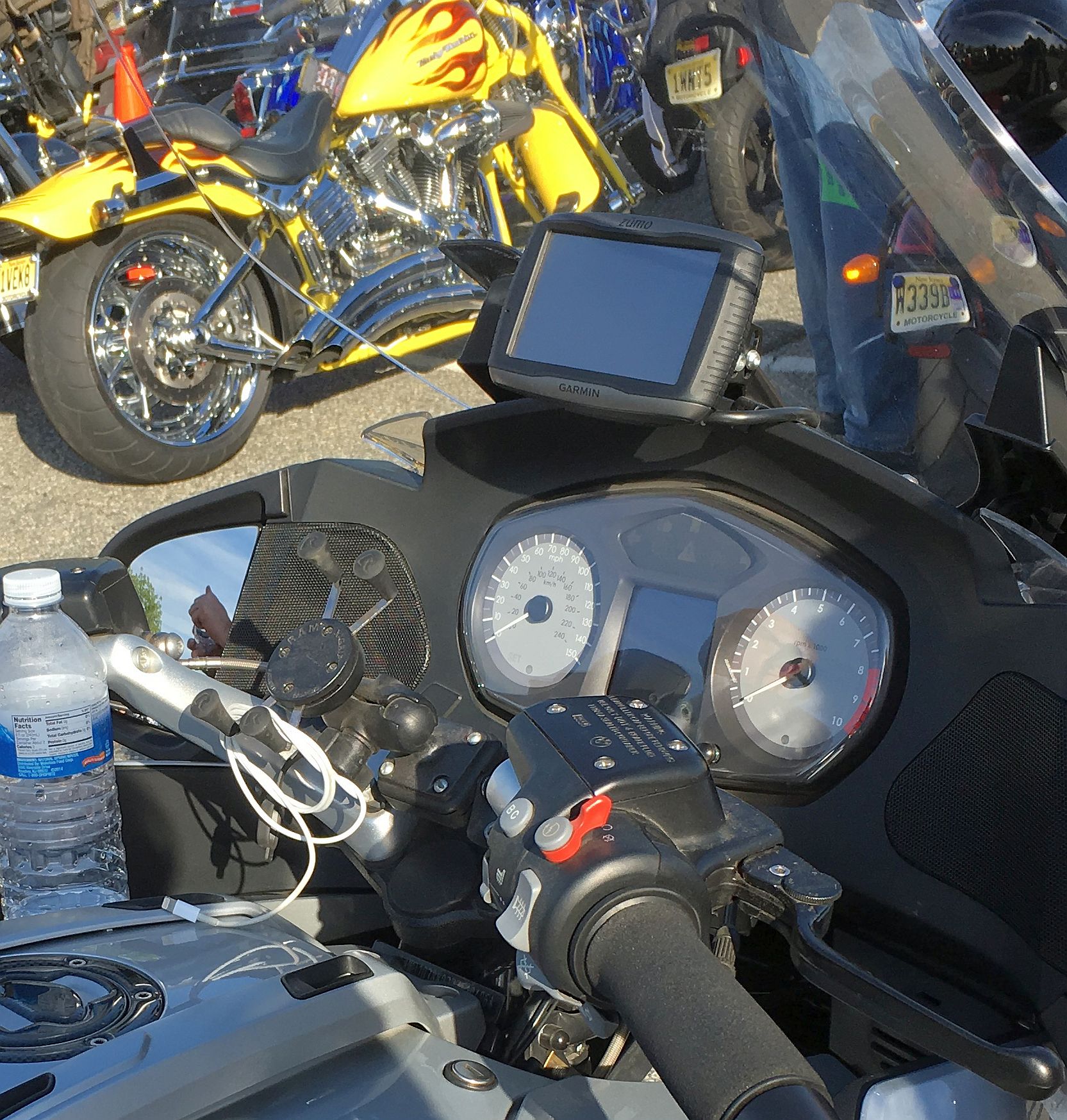
From the outside, the Garmin Zumo 595LM and the Garmin Zumo 590LM look virtually identical, as shown on the BMW cockpit above (aside from dark gray metallic side trim on the 595LM instead of silver). Both share the same 5.0-inch glove-friendly touchscreen that rotates between landscape and portrait views, and both snap interchangeably into the exact same 18-pin motorcycle cradle and automotive suction mount. Where the Zumo 595LM set itself apart was inside its firmware.
1. Garmin Adventurous Routing and Rider Alerts
While the older 590LM offered a basic “Curvy Roads” routing preference, the Zumo 595LM introduced full Garmin Adventurous Routing with adjustable three-level sliders for curves, hills, and highway avoidance. The 595LM also added dedicated Rider Alerts that chime and flash on screen as you approach sharp curves, steep grades, railroad or animal crossings, speed changes, and state borders with differing motorcycle helmet laws, plus a fatigue timer that suggests rest stops after hours in the saddle.
2. PhotoReal Junction View, Trip Gauge, and Service History Log
When navigating complex multi-lane highway interchanges, the Zumo 595LM uses PhotoReal Junction View and Bird’s Eye Junction View to split the screen and display a realistic illustration of overhead road signs alongside a brightly colored arrow pointing to the exact lane you need for your exit. For long-distance touring, the built-in digital fuel trip gauge tracks your mileage per tank and warns you when it is time to look for a gas station, while an integrated Motorcycle Service History Log records dates and odometer readings for oil changes, tire replacements, air filters, and chain maintenance.
3. Lifetime Map Updates and 64 GB FAT32 microSD Card Limit
The “LM” in Garmin Zumo 595LM stands for free Lifetime Map updates for North America, installed by connecting the device to your computer with a USB cable and running Garmin Express. Because current North American map files exceed the 595LM’s internal memory allotment, you will need a microSD memory card installed in the slot beneath the battery pack. Keep in mind that the Zumo 595LM supports microSD cards up to 64 GB maximum, and the card must be formatted as FAT32 (unlike the newer Zumo XT3, which uses exFAT formatting up to 256 GB). See our Garmin Zumo microSD card installation guide for step-by-step formatting help.
4. Bluetooth Helmet Audio, Spotify, and Action Camera Control
Pairing the Zumo 595LM with a motorcycle Bluetooth helmet headset lets you hear spoken street names, make hands-free calls, and control music directly from the 5-inch touchscreen. In addition to the built-in MP3 player and Pandora support carried over from the 590LM, the 595LM added Spotify music playlist browsing when linked to a compatible smartphone. The unit also retains ANT+ remote control support for riders who still own a legacy Garmin VIRB action camera.
5. Tire Pressure Monitoring (TPMS): Legacy ANT+ vs. FOBO Bike 2
Like the 390LM, 395LM, and 590LM, the Garmin Zumo 595LM includes an internal ANT+ receiver designed to read up to four optional Garmin Tire Pressure Monitor Sensor valve caps (part 010-11997-00). Because Garmin discontinued those ANT+ sensors years ago and dropped native TPMS support on the Zumo XT series, riders who want live PSI and tire-temperature warnings today should install the Bluetooth FOBO Bike 2 system. The compact FOBO sensors thread onto rigid metal valve stems and send instant audio and visual pressure alerts to your smartphone, helmet headset, or modern Zumo XT3 screen. Read our motorcycle TPMS and Garmin Zumo compatibility guide for full details.
Motorcycle and Car Mounting Options for the Zumo 595LM
One genuine bright spot of the Zumo 595LM package was that Garmin included both a complete motorcycle mounting setup and an automotive windshield mount with a built-in speaker and 12V cigarette-lighter power cord in the box, allowing a single GPS to serve both your motorcycle and your car or truck.
1. Motorcycle Handlebar and AMPS Cradle Mounting
The powered Garmin Zumo 595LM motorcycle cradle uses the industry-standard 4-hole AMPS mounting pattern (1.188 inches by 1.813 inches) and bolts onto a 1-inch B-size RAM ball adapter. If you are moving an existing 595LM cradle to a second motorcycle or replacing corroded handlebar hardware, the marine-grade aluminum RAM Handlebar U-Bolt Base (RAM-B-231ZU) clamps securely to handlebars from 0.5 inches to 1.25 inches in diameter. Before bolting your cradle down, review our motorcycle GPS mount installation guide for steering lock-to-lock checks and why you should never apply liquid threadlocker near plastic cradle bosses.
2. Using the Zumo 595LM in a Car (17mm Ball & Friction Dash Mount)
Because the Zumo 595LM does not have an internal speaker inside the waterproof GPS body itself, you must snap it into its automotive cradle (and plug in the 12V car power cord) to hear voice prompts inside a car without a helmet headset. The back of the Zumo 595LM automotive cradle uses the standard Garmin 17mm ball socket, which is the exact same socket size used on Garmin Nuvi and Garmin Drive automotive cradles.
If the original windshield suction cup loses its grip or if your state restricts windshield-mounted devices, the weighted Garmin Portable Friction Mount (beanbag dash mount) is a rock-solid upgrade. Weighing nearly 1.5 pounds with a non-skid anti-slide base and a built-in 17mm ball, it sits flat on your vehicle dashboard and lets you snap your Zumo 595LM car cradle right on without leaving suction rings on the glass.
Frequently Asked Questions
Does the Garmin Zumo 595LM fit into a Zumo 590LM motorcycle cradle?
Yes. The Garmin Zumo 590LM and Zumo 595LM share the exact same physical casing dimensions (5.9 x 3.8 x 1.3 inches), top lever latch, and 18-pin rear electrical contact layout. You can snap a Zumo 595LM directly into an existing Zumo 590LM motorcycle or car cradle without changing the wiring harness.
Can I upgrade a Garmin Zumo 590LM to 595LM software?
While regular hobbyist forum threads have discussed cross-flashing 595LM firmware onto a 590LM board, Garmin does not officially support converting a 590LM into a 595LM, and an interrupted flash can permanently brick the unit. If you want modern routing and smartphone tools, upgrading to a Garmin Zumo XT3 is far more reliable.
Why does my Garmin Zumo 595LM screen look dim in daylight?
The Zumo 595LM uses an older reflective/transflective panel that relies on ambient light bouncing off the rear layer of the display. Unlike the radiant high-nit IPS screens on the Zumo XT2 and XT3, the 595LM looks noticeably dimmer when riding in shadows or when viewed at a flat angle. Tilting the screen slightly toward your chin or adding a sun visor helps; see our motorcycle GPS sun glare guide for setup tips.
Bottom Line
In its day, the Garmin Zumo 595LM was the most feature-packed touring navigator on the market, and if you already have one bolted to your bike, a fresh third-party 361-00077-10 battery and a 64 GB FAT32 microSD card will keep its Lifetime Maps running reliably. However, if you are putting together a new navigation setup or want to leave dim screens, desktop USB map updates, and the retired Smartphone Link app behind, upgrading to the 6-inch Garmin Zumo XT3 delivers a massive leap in screen brightness, speed, and wireless convenience.