
When the Garmin Zumo 590LM debuted in 2014, it marked a major milestone for touring and adventure riders as Garmin’s first dedicated motorcycle navigator with a 5-inch dual-orientation touchscreen. More than a decade later, the Zumo 590LM (and its nearly identical successor, the Zumo 595LM) is long discontinued and completely unavailable through retail channels. However, thousands of these rugged units remain bolted to motorcycles around the world, leaving current owners and used-bike buyers searching for replacement batteries, BMW mounting answers, and a clear comparison against modern navigators.
Whether you are trying to revive an existing Zumo 590LM that shuts off minutes after leaving the cradle or deciding if it is finally time to retire its bulky wiring harness for a modern high-definition display, this guide covers the unit’s hardware strengths, its most common aging failures, and the best current upgrades. Our recommendations draw on 20 years of experience selling and evaluating GPS devices and mounting equipment, supported by product research and technical analysis.
Quick answer: Do not buy a Garmin Zumo 590LM today unless it is already installed on a used motorcycle you just purchased. The hardware, display technology, Smartphone Link companion app, and ANT+ tire-pressure sensors are all obsolete. If you already own a working 590LM with a weak battery, installing a freshly manufactured third-party 361-00077-10 replacement battery pack (since Garmin OEM batteries are no longer made) and tightening the four-pin plug contacts will keep it running on Lifetime Maps. If you are shopping for a new cockpit navigator, skip the discontinued 590LM and upgrade to the 6-inch Garmin Zumo XT3.
Why the Garmin Zumo 590LM Is Obsolete (And What to Buy Instead)
In its prime, the Garmin Zumo 590LM set the standard for weatherproof motorcycle navigation. Stepping up from the older 4.3-inch Zumo 660 and 390LM platforms, the 590LM introduced a 5-inch diagonal display that could be rotated between landscape and portrait views, alongside hands-free Bluetooth audio, MP3 and Pandora music controls, and optional tire pressure monitoring. Unlike a standard automotive GPS that overheats in the sun, washes out in daylight, and shakes apart on handlebars, the Zumo 590LM was engineered with an IPX7 waterproof housing capable of surviving heavy rain, road spray, fuel splashes, and constant engine vibration.
Despite that durable outer shell, a decade of hardware and software evolution has left the Zumo 590LM obsolete in four critical areas:
- Dim, low-resolution display technology: The 590LM uses an older 800 x 480 pixel transflective resistive touchscreen. While it remains readable when direct sunlight hits the screen at the right angle, it looks noticeably dull, grainy, and washed out under overcast skies or forest canopy compared to modern high-brightness HD IPS displays.
- The bulky 18-pin multi-branch wiring harness: Installing a Zumo 590LM cradle requires routing a thick, heavy wiring loom packed with unused pigtails (including hardwired 12V battery leads, a USB charging tail inside a weather cap, and separate 3.5 mm audio-in, audio-out, and microphone jacks). Modern Zumo cradles use a single slim power cable.
- Discontinued Smartphone Link app: The 590LM relies on the legacy Garmin Smartphone Link app for live weather and traffic. Garmin retired Smartphone Link years ago in favor of Garmin Drive (for the original Zumo XT) and the Garmin Tread app (for the Zumo XT2 and XT3), and the old app struggles to maintain background connections on current iOS and Android operating systems.
- Unavailable accessories and slow processor: Both the Zumo 590LM unit and its proprietary ANT+ Tire Pressure Monitor Sensors have been out of production for years, and the internal processor recalculates long multi-stop GPX routes much slower than current-generation hardware.
| Specification / Feature | Garmin Zumo 590LM (Discontinued) | Garmin Zumo XT3 (Current 6-Inch Flagship) |
|---|---|---|
| Display Size & Resolution | 5.0-inch transflective (800 x 480 pixels) | 6.0-inch HD glove-friendly display (1280 x 720 pixels; 4.7-inch size also made) |
| Device Weight | 13.2 ounces (374.5 grams) | Approximately 12 ounces (6-inch model) |
| Internal Storage & microSD Format | Internal solid state; microSD up to 64 GB (FAT32 required) | 64 GB internal storage; microSD up to 256 GB (exFAT supported) |
| GPS Positioning Rate | Standard 1 Hz receiver | High-speed 25 Hz multi-GNSS positioning |
| Battery Life Claim | Up to 4 hours (removable 361-00077-10 pack) | Up to 7 hours (or up to 5 hours at 100% backlight) |
| Environmental Rating | IPX7 waterproof | IPX7 water rating, IP6X dust rating, MIL-STD-810 tested |
| Smartphone Companion App | Garmin Smartphone Link (legacy/discontinued) | Garmin Tread app (wireless GPX sync, Great Rides, Group Ride Mobile) |
| Map Updates | USB cable to PC via Garmin Express | Built-in Wi-Fi updates without a computer (plus USB-C) |
The Best Modern Upgrade: 6-Inch Garmin Zumo XT3
If your Zumo 590LM cradle has corroded pins, a cracked digitizer, or a screen you can barely read at noon, upgrading to the 6-inch Garmin Zumo XT3 solves every frustration of the 590LM platform while fitting into a smaller, lighter footprint. Even though the 6-inch Zumo XT3 gives you a full inch of additional diagonal screen real estate and a crisp 1280 x 720 HD resolution, it weighs less than the chunky 5-inch 590LM (roughly 12 ounces versus 13.2 ounces) and uses the exact same 4-hole AMPS mounting pattern on the back of its cradle.
Instead of hauling your GPS indoors to plug a micro-USB cable into a desktop computer for map updates or GPX transfers, the Zumo XT3 updates its maps directly over home Wi-Fi and syncs GPX routes wirelessly from your phone via the Garmin Tread app. It also adds 64 GB of internal storage, a fast 25 Hz GPS refresh rate, live lean-angle data, and IP6X dust protection alongside IPX7 waterproofing. Read our full Garmin Zumo XT3 review or our motorcycle GPS buying guide for a complete breakdown of the XT3 lineup.
How to Fix the Garmin Zumo 590LM Battery Problem (Part 361-00077-10)
If you already own a Garmin Zumo 590LM or 595LM that works well when locked into the powered motorcycle cradle but displays a “Battery Low” warning and shuts down within five minutes of turning off the bike’s ignition, you are dealing with the most common failure on this model. Because the Zumo 590LM features a latch-open battery door on the back of the chassis, restoring off-bike battery runtime is an easy 10-minute DIY repair.
1. Replace the Aging 361-00077-10 Battery with a Fresh Third-Party Pack
The Garmin Zumo 590LM and 595LM use a removable 3.7-volt rechargeable lithium-ion battery pack (Garmin part numbers 361-00077-00, 361-00077-10, 616-00077-00, and 616-00077-10) that plugs into the circuit board via a small white four-wire connector. After years of heat cycles in the sun and winter storage in unheated garages, the original factory cells lose their capacity to hold a full charge.
Because Garmin discontinued OEM battery production for the 590LM and 595LM years ago, original Garmin-branded batteries are no longer available. In fact, you should avoid buying “new-old-stock” OEM Garmin batteries even if you spot one on a secondary auction site: lithium-ion cells degrade chemically on the shelf when left uncharged for years, meaning a decade-old factory pack will often arrive dead or unable to hold capacity. Instead, choose a newly manufactured third-party 361-00077-10 replacement battery built with fresh lithium-ion cells and the matching four-pin Garmin plug.
To swap the battery, slide the release latch on the back cover of the Zumo 590LM, lift off the battery door, and gently pull the small white plastic four-pin plug straight out of its socket on the motherboard (pull on the plastic plug housing rather than yanking the thin red, white, and black wires). Drop in the third-party replacement pack, seat the four-pin plug firmly, and charge the unit overnight via a wall USB adapter so the internal battery meter recalibrates properly.
2. Check the Four-Pin Battery Plug Terminal Crimps
In addition to chemical battery aging, the Zumo 590LM is notorious for a subtle mechanical connection flaw inside the tiny white four-pin battery plug. Over thousands of miles of motorcycle vibration, the miniature female metal crimp sleeves inside the white plastic plug loosen slightly around the male pins on the Zumo’s circuit board. That slight contact resistance causes a voltage drop that tricks the Zumo’s voltage sensor into reading the battery as empty even when the cells are charged.
Important: Whenever you unplug or install a Zumo 590LM battery, inspect the four tiny metal sockets inside the white plastic plug with a magnifying glass. Using the tip of a sewing needle or straight pin, very gently nudge the tiny metal spring tabs inside each of the four slots inward by a fraction of a millimeter so they grip the motherboard pins tightly when plugged back in. Also keep the 18 gold pogo pins on your motorcycle cradle clean with electrical contact cleaner, and always snap the rubber weather cap over the empty cradle when washing the bike.
Mounting the Garmin Zumo 590LM on a BMW Motorcycle (Navigator V & VI Compatibility)

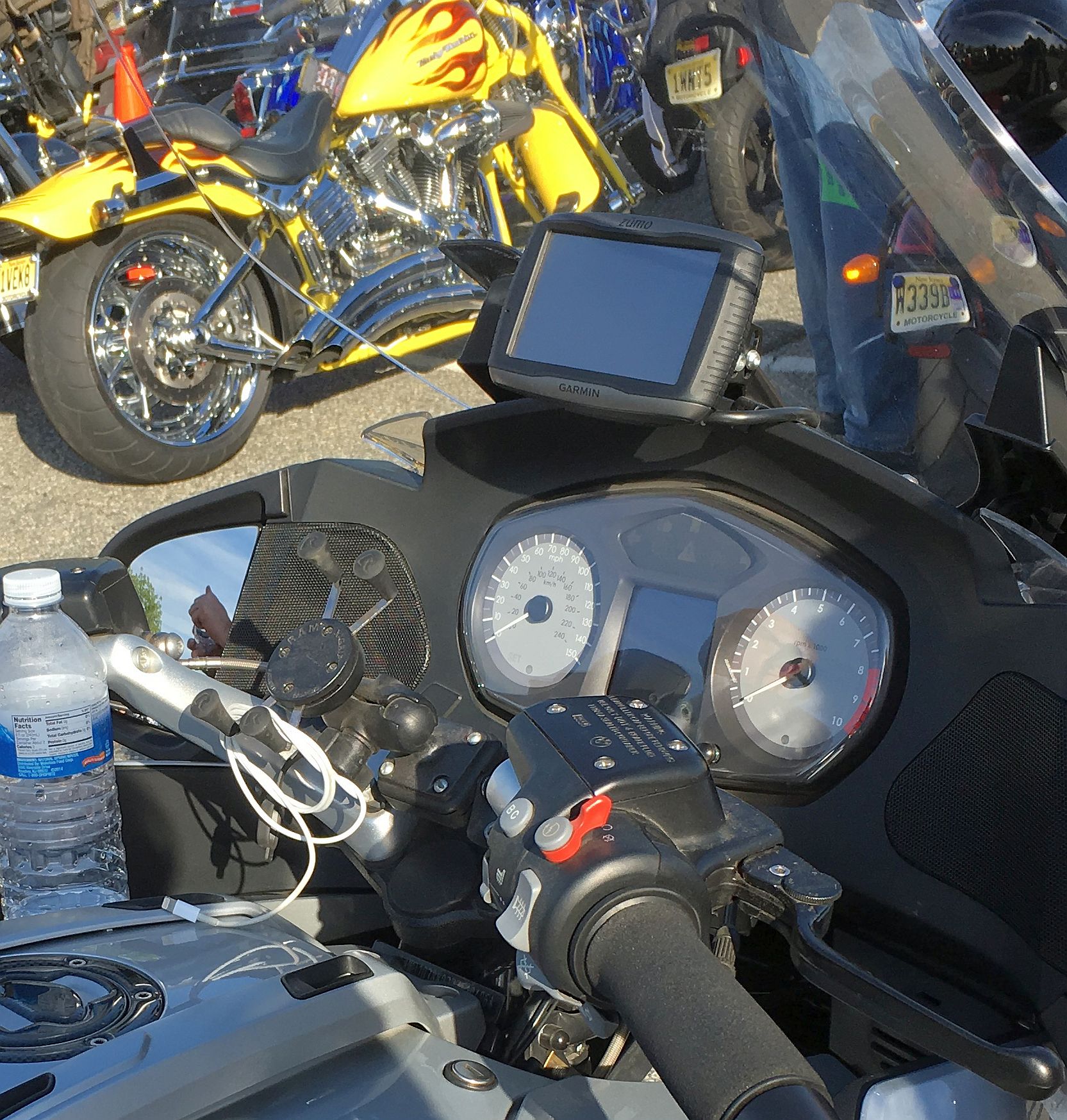
The photograph above shows a Garmin Zumo 590LM installed on a BMW motorcycle cockpit, which leads directly to one of the most frequent compatibility questions from BMW R1200GS, R1250GS, R1200RT, and K1600 owners: Will a standard Garmin Zumo 590LM snap into the factory BMW Motorrad Navigation Preparation (Navigator V / Navigator VI) cradle?
No, the Garmin Zumo 590LM does not fit the factory BMW Motorrad Navigator cradle. On the earlier 4.3-inch generation, Garmin built both the retail Zumo 660 and the dealer-sold BMW Motorrad Navigator IV inside the same physical outer casing, allowing a Zumo 660 to click directly into a BMW factory four-button mount. When Garmin released the 5-inch generation, however, the retail Zumo 590LM and the dealer-only 5-inch BMW Motorrad Navigator V were given completely different body shells and cradle latches. The Zumo 590LM is physically thicker (1.18 inches deep), heavier, and uses a top lever-lock cradle with an 18-pin rear contact block that will not seat inside a BMW Nav Prep mount.
How to Mount a Zumo 590LM (or Zumo XT3) on a BMW Cockpit
To mount a Garmin Zumo 590LM on a BMW or any other touring motorcycle, you must bolt the dedicated Garmin Zumo 590LM powered motorcycle cradle to your bike using standard 4-hole AMPS mounting hardware (spaced at 1.188 inches by 1.813 inches). Garmin originally bundled the 590LM with a metal RAM handlebar and brake/clutch reservoir mount kit featuring a 1-inch B-size rubber ball, a medium double-socket arm, and a diamond or square AMPS ball base that bolts to the back of the Garmin cradle using four M4 machine screws and nylock nuts.
If you bought a secondhand Zumo 590LM that is missing its handlebar hardware, or if you want to move your cradle to a second motorcycle, the complete RAM Handlebar and Brake/Clutch Perch Mount Kit (RAM-B-174-GA7U) provides the exact metal U-bolt, clutch perch bolts, double-socket arm, and AMPS ball base needed. For step-by-step torque and fastener advice (including why you should never apply liquid threadlocker near a plastic GPS cradle), read our motorcycle GPS mount installation guide.
Core Features of the Garmin Zumo 590LM for Current Owners
If your Zumo 590LM is still running strong with a healthy battery, it remains a capable offline navigator when paired with proper memory-card formatting and modern accessories.
1. 5-Inch Glove-Friendly Dual-Orientation Display
The Zumo 590LM’s 5-inch resistive touchscreen (4.25 inches wide by 2.55 inches high) responds to physical finger pressure rather than electrical skin capacitance, meaning you can tap menu icons wearing heavy winter leather gauntlets or waterproof touring gloves that wouldn’t register on an older smartphone. It is also one of the first motorcycle GPS units to allow rotation between landscape mode (for wide peripheral view at intersections) and portrait mode (to see more of the road ahead on winding mountain passes).
2. Lifetime Map Updates and microSD Card Formatting Rules
The “LM” suffix in Garmin Zumo 590LM stands for Lifetime Maps, guaranteeing free North American City Navigator street map updates up to four times per year for the useful operational life of the device. Because the 590LM does not have built-in Wi-Fi, you must connect the GPS to a Windows PC or Mac using a micro-USB data cable and run the free Garmin Express desktop application to install map updates.
Because modern North American map files have grown much larger since 2014, Garmin Express will ask you to insert a microSD card into the slot inside the 590LM’s battery compartment. Note that the Zumo 590LM and 595LM support a maximum microSD card capacity of 64 GB, and any card you insert must be formatted as FAT32 (unlike the newer Zumo XT3, which supports exFAT cards up to 256 GB). Follow our Garmin Zumo microSD card installation guide for exact formatting instructions.
3. Bluetooth Helmet Audio, MP3 Player, and Car Mount Versatility
Through its dual-channel Bluetooth interface, the Zumo 590LM pairs simultaneously with your smartphone and your motorcycle Bluetooth helmet headset. Once linked, it broadcasts spoken street names, hands-free phone calls, and music tracks directly into your helmet speakers. The unit includes an internal MP3 player that reads audio files stored on your microSD card and offers on-screen playback controls (which should only be adjusted when safely parked). Garmin also included an automotive windshield suction cup mount with an integrated speaker and a 12V cigarette-lighter power cable in the original box so the 590LM could double as a car navigator.
4. Tire Pressure Monitoring (TPMS): Legacy ANT+ vs. Modern Bluetooth
One standout feature of the Zumo 590LM (alongside the 390LM, 395LM, and 595LM) was its built-in ANT+ wireless receiver, which paired with Garmin’s optional valve-cap Tire Pressure Monitor Sensors (part 010-11997-00) to display live PSI readings, slow-leak trends, and custom cold-weather pressure alerts right on the GPS screen. Because those original Garmin ANT+ sensors are completely discontinued and out of stock everywhere, riders who want live tire pressure and temperature alerts today should install a modern Bluetooth system like the FOBO Bike 2.
The ultralight FOBO Bike 2 sensors thread onto rigid metal valve stems, run for up to a year on replaceable CR1632 coin batteries, and broadcast live PSI readings to your iOS or Android phone via Bluetooth 5.0 (sending audio warnings directly to your helmet headset, or smart notification banners to a modern Garmin Zumo XT3). See our complete motorcycle TPMS and Garmin Zumo compatibility guide for setup details and metal valve-stem safety requirements.
Frequently Asked Questions
What is the difference between the Garmin Zumo 590LM and Zumo 595LM?
The Garmin Zumo 595LM (released in 2016) uses the exact same physical housing, 5-inch 800 x 480 transflective screen, 361-00077-10 battery pack, and 18-pin powered motorcycle cradle as the Zumo 590LM. A Zumo 590LM and 595LM can snap interchangeably into the same motorcycle mount. The 595LM simply added updated firmware features such as Garmin Adventurous Routing sliders, rider safety alerts for sharp curves and railroad crossings, smart notifications on screen, and Spotify music control.
Does the Garmin Zumo 590LM still receive free Lifetime Map updates?
Yes. As long as your Zumo 590LM remains in working hardware condition and you install a FAT32-formatted microSD card (up to 64 GB) to accommodate the expanded file size of current North American maps, you can continue downloading free City Navigator map updates through the Garmin Express computer program.
Can I use the Garmin Zumo 590LM wiring harness with a new Zumo XT3?
No. The Zumo 590LM uses a wide 18-pin cradle connector with an external 12V-to-5V converter box and multiple audio pigtails, whereas the Garmin Zumo XT3 uses a compact two-pin powered mount with a slim power cable. However, because both cradles use the standard 4-hole AMPS bolt pattern, you can unbolt the 590LM cradle from your existing RAM AMPS ball plate, bolt the new Zumo XT3 cradle onto the exact same RAM mount, and route the new two-wire power lead to your switched 12V accessory circuit.
What is the Harley-Davidson Road Tech Zumo 590?
The Road Tech Zumo 590 is an OEM Harley-Davidson branded version of the Garmin Zumo 590LM. It uses the same internal battery (361-00077-10), 5-inch screen, and 18-pin cradle, but adds preloaded Harley-Davidson dealership points of interest, custom boot graphics, and audio integration profiles tailored for Harley touring fairings.
Bottom Line
The Garmin Zumo 590LM earned its reputation as a tank-like touring navigator, and if you already have one mounted on your motorcycle, a freshly manufactured third-party 361-00077-10 replacement battery and a FAT32 microSD card will keep it navigating reliably for seasons to come. However, with the unit and its original Garmin accessories long discontinued, riders putting together a new cockpit or tired of squinting at a dim 2014 display will get a dramatic upgrade in screen brightness, speed, and wireless convenience by moving up to the 6-inch Garmin Zumo XT3.