The Beeline Moto 2 takes a very different approach to motorcycle navigation. Instead of putting a large map, dozens of menus, and a full standalone GPS on your handlebars, Beeline gives you a small dedicated display that works with the GPS and Beeline app on your smartphone. The result is one of the cleanest motorcycle navigation setups available, but that simplicity comes with a few tradeoffs.
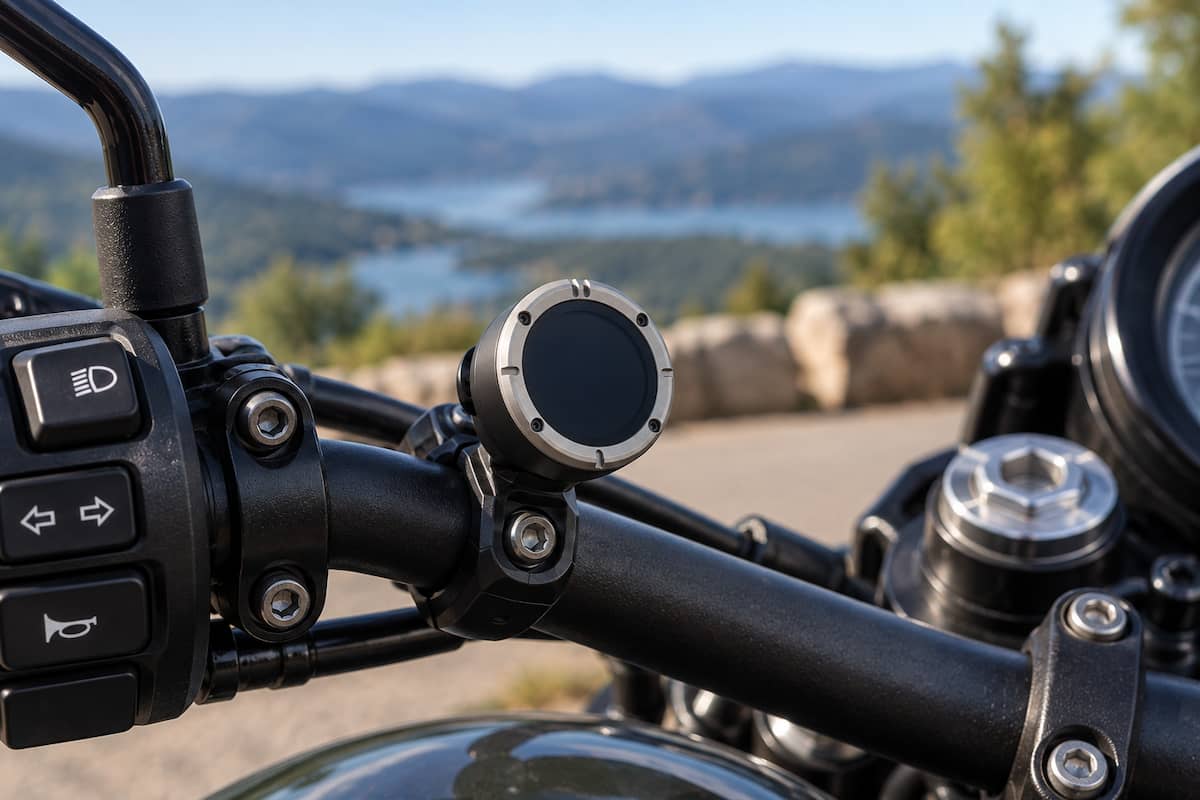
If your idea of the perfect motorcycle GPS is a large screen showing every road around you, the Moto 2 probably is not it. If you want clear turn information, a compact display, long battery life, and almost no cockpit clutter, the Beeline Moto 2 starts to make a lot of sense.
Beeline Moto 2 at a Glance
| Feature | Beeline Moto 2 |
|---|---|
| Display | 1.45-inch color IPS TFT |
| Resolution | 412 x 412 |
| Battery Life | Up to 14 hours riding time |
| Weather Rating | IP67 |
| Charging | USB-C or optional powered mount |
| Phone Required? | Yes |
| GPX Support | Yes, through the Beeline app |
| Best For | Riders wanting compact, distraction-free navigation |
| Buy | View on Amazon |
What Is the Beeline Moto 2?
The first thing to understand is that the Beeline Moto 2 is not a traditional standalone motorcycle GPS.
A Garmin Zumo can calculate routes and provide navigation using hardware and maps contained within the GPS itself. The Beeline works differently. Your smartphone and the Beeline app handle GPS positioning, route planning, and much of the navigation work. The Moto 2 connects to your phone over Bluetooth and becomes the compact display mounted on your motorcycle.
That distinction matters.
If your phone is part of the system anyway, you might wonder why you would not simply mount the phone on your handlebars. The answer is that Beeline is trying to solve a different problem.
A phone mounted directly in front of you provides a lot of information, but it also means putting an expensive smartphone out in the weather and exposing it to motorcycle vibration. It can also make your cockpit look crowded, especially on motorcycles with limited space around the gauges.
The Moto 2 lets the phone stay protected in your pocket, jacket, tank bag, or luggage while the much smaller Beeline display handles the information you need while riding.
The Moto 2 Screen Is Small on Purpose
The 1.45-inch display is the part of the Beeline Moto 2 that will either sell you on the idea or convince you to buy something else.
It is tiny compared with a traditional motorcycle GPS.
That is not necessarily a weakness. It is the central idea behind the product.
The Moto 2 uses a 412 x 412 color display with an anti-reflective coating. Instead of trying to recreate Google Maps on a tiny circle, Beeline concentrates on the next piece of useful information. Depending on the navigation mode, you can see upcoming turns, distance, route progress, speed information, and other ride data without having a large map occupying the cockpit.
This works especially well on a motorcycle because riders generally need very little information at any particular moment. You need to know that the next turn is coming, which direction to go, and how far away it is.
What you do not get is the same broad visual context available from a large Garmin screen or a smartphone. In a complicated urban interchange, that extra map context can be useful. The Beeline asks you to trade some of that context for a cleaner and less distracting interface.
How Navigation Works
Routes are planned using the Beeline app on your phone. Once a ride starts, the phone supplies GPS positioning and communicates the navigation information to the Moto 2 through Bluetooth.
Beeline offers conventional turn-by-turn guidance, but it also focuses heavily on motorcycle-oriented route planning.
You can select faster routing when you simply want to reach your destination or choose routing designed to produce a more enjoyable motorcycle ride. That makes the system more interesting than simply shrinking conventional automobile navigation onto a smaller screen.
There is also a compass-style navigation mode for riders who want less rigid guidance. Instead of giving you every turn, the display can point toward your destination and leave the route between those points largely up to you.
That feature fits the Beeline philosophy extremely well. Sometimes the point of riding a motorcycle is not finding the fastest possible route.
Does the Beeline Moto 2 Need Your Phone?
Yes.
This is one of the most important differences between the Beeline Moto 2 and a standalone motorcycle GPS.
The Moto 2 is designed to work with the Beeline app on a compatible smartphone. The phone provides GPS data and handles routing while the Moto 2 serves as the dedicated motorcycle interface.
For most riders this will not be a major inconvenience. Nearly everyone already carries a phone while riding, and keeping it safely stored rather than exposed on the handlebars can be an advantage.
There are still situations where a standalone GPS has an edge. Long-distance riders traveling through remote areas, riders who routinely operate without their phone nearby, or anyone who specifically wants an independent navigation device may be better served by a Garmin Zumo.
Battery Life and Charging
Beeline rates the Moto 2 for up to 14 hours of riding time from its rechargeable 600mAh battery.
That is enough for most full-day rides without connecting the unit to motorcycle power.
The Moto 2 also uses USB-C charging, which is a welcome improvement over proprietary charging cables. For riders who spend multiple days on the road, Beeline offers a powered mounting option that can keep the device charged while riding through pogo-pin contacts on the back of the unit.
This gives you two reasonable ways to use it.
- Occasional or weekend riding: Charge the Moto 2 at home and use its internal battery.
- Touring: Install the powered mount and stop worrying about battery life.
The second option makes much more sense for a motorcycle that regularly covers long distances.
Weather Resistance
The Beeline Moto 2 carries an IP67 rating.
That means the device is built to handle dust and water exposure associated with motorcycle use. Beeline also uses a hydrophobic coating on the display to help with visibility when rain and road spray reach the screen.
This is another major advantage over simply mounting a smartphone on the motorcycle. Many modern phones are water resistant, but exposing your primary communication device to rain, bugs, vibration, heat, and constant outdoor use is still not ideal.
The Beeline is designed from the beginning to live on the motorcycle.
Buttons Instead of a Touchscreen
The Moto 2 uses physical controls rather than asking you to operate a tiny touchscreen while wearing motorcycle gloves.
That is the right decision for this type of device.
The controls are designed to be operated from the front and are easier to use with gloves than small on-screen menus. There is also far less to control than on a traditional GPS because the complicated route planning is handled on the phone before or during the ride.
The objective is to interact with the Moto 2 as little as possible.
Beeline Moto 2 Mounting Options
Mounting is one of the stronger parts of the Beeline ecosystem.
The standard Moto 2 includes a compact mounting solution, but Beeline also supports several ways to integrate the device into different motorcycle cockpits. Options include handlebar mounting, mirror or crossbar mounting, fork stem mounting, a 1-inch ball adapter, an AMPS-compatible adapter, and a powered mount.
The 1-inch ball option is especially useful because it opens the door to a large selection of RAM-style motorcycle mounting components and makes it easier to place the Beeline exactly where you want it.
We have a separate Beeline Moto 2 mounting guide covering those options in detail.
Keeping the mounting discussion separate also makes sense because choosing the right mount depends heavily on the motorcycle. A naked bike with an open handlebar presents a very different mounting situation from a sportbike with clip-ons and a usable fork stem.
Beeline App and Beeline Plus
You do not have to subscribe to Beeline Plus simply to use the Moto 2.
The standard Beeline app provides the core route planning and navigation functionality. Beeline also offers a paid Plus tier that adds features aimed at riders who want more advanced route information.
Current Plus features include:
- Live traffic information and traffic-aware rerouting
- Speed camera alerts where supported and permitted
- Loop route generation
- Additional route-planning features
- 3D mapping within the app
The subscription is worth knowing about before buying because some features riders may assume are included with the hardware are part of the premium app tier instead.
On the other hand, Beeline has not placed basic motorcycle navigation behind the subscription. You can buy the Moto 2 and use its primary navigation functions without paying an ongoing fee.
GPX Routes and Ride Planning
The Moto 2 can also fit into a more advanced touring workflow because the Beeline ecosystem supports GPX route import and export.
This matters if you plan rides using another mapping program, download motorcycle routes from other riders, or want to save and share your own trips.
Instead of trying to manage those files directly on the small Moto 2 display, route management happens through the phone and Beeline app.
That is another good example of why the product works better if you think of it as a motorcycle display connected to a navigation platform rather than a miniature Garmin.
Beeline Moto 2 vs a Smartphone
| Feature | Beeline Moto 2 | Phone on Motorcycle |
|---|---|---|
| Screen Size | Very small | Large |
| Map Detail | Minimal | Excellent |
| Cockpit Clutter | Very low | Higher |
| Phone Vibration Exposure | Phone can remain stored | Phone is mounted to bike |
| Weather Exposure | Purpose-built IP67 device | Depends on phone |
| Phone Still Required | Yes | It is the navigator |
The phone wins easily for map detail.
The Beeline wins if your goal is to get the phone off the handlebars while retaining phone-powered navigation.
Beeline Moto 2 vs Garmin Zumo XT3
The current Garmin Zumo XT3 represents almost the opposite philosophy.
Garmin gives riders a complete standalone motorcycle navigator with a much larger high-resolution display, detailed maps, dedicated motorcycle routing features, topographic mapping, satellite imagery support, and a long list of advanced riding functions.
The Zumo XT3 is available with either a 4.7-inch or 6-inch display. The Beeline display is only 1.45 inches.
That sounds like an automatic win for Garmin until you look at what the two products are trying to accomplish.
| Feature | Beeline Moto 2 | Garmin Zumo XT3 |
|---|---|---|
| Type | Phone-connected navigation display | Standalone motorcycle GPS |
| Display | 1.45 inches | 4.7 or 6 inches |
| Phone Required | Yes | No for core navigation |
| Navigation Style | Minimal turn information | Full detailed mapping |
| Battery Life | Up to 14 hours | Up to 7 hours |
| Best Fit | Minimalist road navigation | Touring, adventure and detailed navigation |
The Garmin is the stronger tool if you want detailed maps, independent navigation, off-road information, and maximum routing capability.
The Beeline is far smaller and simpler. It almost disappears into the motorcycle cockpit.
Choosing between them is less about which device has more features and more about how much navigation information you want in front of you.
What We Like About the Beeline Moto 2
- Extremely compact: It does not dominate the motorcycle cockpit.
- Long battery life: Up to 14 hours covers most full riding days.
- Purpose-built for motorcycles: IP67 weather resistance and glove-friendly controls matter on a bike.
- Phone stays protected: Your expensive smartphone can remain in a pocket or luggage.
- Interesting route options: Fast, fun, and compass-style riding fit motorcycle use well.
- USB-C charging: No need to carry another unusual charging cable.
- Good mounting ecosystem: Handlebar, stem, mirror, AMPS, 1-inch ball, and powered options provide plenty of flexibility.
What We Do Not Like
- The phone is still required: Moto 2 is not an independent GPS.
- Limited map context: The small screen cannot replace the detailed map view of a large Garmin or phone.
- Some features require Beeline Plus: Live traffic and several advanced tools are part of the paid tier.
- Complex intersections can favor a larger display: Sometimes seeing the surrounding roads is useful.
- Minimalism is not for everyone: Riders who enjoy having lots of trip data visible may find the Moto 2 too sparse.
Who Should Buy the Beeline Moto 2?
The Beeline Moto 2 makes the most sense for riders who already carry a smartphone but do not want that phone mounted prominently on the motorcycle.
It is particularly appealing on motorcycles where appearance matters. A large GPS can look out of place on a cafe racer, naked motorcycle, modern classic, or minimalist cockpit. The Moto 2 is small enough that it can look more like another motorcycle instrument than an aftermarket navigation screen.
It also makes sense for riders who find large navigation screens distracting.
You should strongly consider the Moto 2 if you:
- Prefer simple turn-by-turn directions
- Want to keep your smartphone off the handlebars
- Want a small and clean cockpit installation
- Primarily ride on roads
- Enjoy scenic or less direct motorcycle routes
- Already carry your phone on every ride
Who Should Skip It?
A Garmin-style standalone GPS is still the better fit for some riders.
Skip the Moto 2 if you regularly want to study a detailed map while stopped, navigate remote areas where you want a completely independent device, rely heavily on topographic information, or simply prefer seeing the entire road network around you.
Adventure riders spending significant time away from paved roads may also prefer a larger navigation platform with more detailed mapping.
Final Thoughts on the Beeline Moto 2
The smartest thing about the Beeline Moto 2 is that it does not try to beat Garmin by becoming another Garmin.
It goes in the opposite direction.
The Moto 2 takes the processing power and GPS hardware you already carry in your pocket and pairs it with a small motorcycle-specific display. You get the information needed to follow a route without mounting a phone-sized computer in the middle of the motorcycle.
That simplicity is both the product’s greatest strength and its main limitation.
If you want detailed maps, maximum navigation capability, and a GPS that operates independently of your phone, buy a traditional motorcycle GPS.
If you want navigation to fade into the background and let the motorcycle remain the focus of the ride, the Beeline Moto 2 is one of the more interesting alternatives currently available.
Frequently Asked Questions
Is the Beeline Moto 2 a real GPS?
The Moto 2 is a motorcycle navigation device, but it relies on the GPS and Beeline app running on a connected smartphone rather than operating as a fully independent GPS navigator.
Can I use the Beeline Moto 2 without my phone?
Not for normal route navigation. A compatible smartphone running the Beeline app is part of the navigation system.
Does the Beeline Moto 2 require a subscription?
No. Core Beeline navigation does not require Beeline Plus. The optional Plus subscription adds features including live traffic, loop route generation, 3D mapping, and speed camera alerts where available.
Is the Beeline Moto 2 waterproof?
It carries an IP67 water and dust resistance rating and is designed for outdoor motorcycle use.
How long does the Beeline Moto 2 battery last?
Beeline rates the Moto 2 for up to 14 hours of riding time. A powered motorcycle mount is also available for riders who want continuous charging.
Can the Beeline Moto 2 import GPX routes?
Yes. GPX route files can be handled through the Beeline app, making the Moto 2 useful for riders who create or download routes in other applications.
Is the Beeline Moto 2 better than a Garmin Zumo?
They serve different types of riders. A Garmin Zumo provides a much larger screen, standalone navigation, and significantly more detailed mapping. The Beeline Moto 2 prioritizes size, simplicity, and a clean motorcycle cockpit while using your phone to power the navigation experience.